Share this page


My Applications
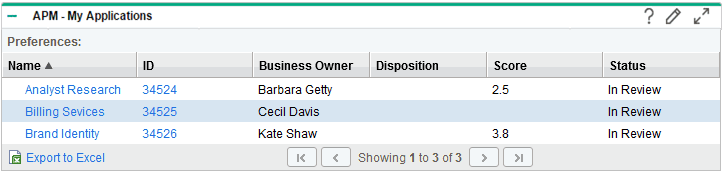
The My Applications portlet displays a list of applications that you created or own. You can create a customized version of the portlet to track and assess data meaningful to you.
By default, applications are listed alphabetically by name.
Figure B-9. Example of the My Applications portlet
To select the type of data that is displayed in this portlet and how the data is displayed, set the preference settings and filters.
|
Field (*Required) |
Description |
|---|---|
|
Application(s) |
Select zero, one, or more applications that you own to display. If no applications are specified, all applications you own are displayed. |
|
Health |
Select zero, one, or more color-coded indicators of the application's health to display. Only applications that have this health are displayed. If no health is specified, all applications for which data is available are displayed. |
|
Status |
Select a status of the applications to display. Only applications that have this status are displayed. |
|
Supported Process |
Select a business process supported by the application. Only applications that support this business process are displayed. If no business process is specified, all applications for which data is available are displayed. |
|
Is Orphan? |
Select applications that do or do not support a business process.
|
|
Display preferences summary on portlet |
Display the preferences you have selected at the top of the portlet. |
|
Sort By |
Select the column used to sort the data. |
|
Ascending/Descending |
Indicate the sorting sequence. |
|
*Rows Displayed |
Default: 5 Specify the number of applications displayed in the normal portlet view. Type any integer greater than zero. |
|
*Rows Displayed in Maximized View |
Default: 50 Specify the number of applications displayed in a maximized portlet. Type any integer greater than zero. |
|
Available Columns |
The names of columns that can be displayed in the portlet but are currently not displayed. See the online portlet help for a description of each column. |
|
Displayed Columns |
Select the names of the columns to display in the portlet and the order in which they are displayed. |
|
Additional Columns Displayed in Maximized View |
Select the names of the columns to display in a maximized portlet and the order in which they are displayed. |